Invoice processing automation uses software to move a supplier invoice from arrival to a posted accounting record. It reads the fields, checks them against your records, routes the approval and writes the result to your accounting system. People handle the exceptions, and paying the invoice stays a separate, controlled step.
A hypothetical example: a supplier emails invoice INV-2048 for 12 units at USD 40 each. The purchase order says 12; the goods receipt says 10. Software can read every field correctly and still must not post this invoice. The right result is a review task that shows the two-unit gap to the person who owns receiving. The exception section follows this invoice through.
This guide is for finance and operations leads whose team still re-keys invoices and chases approvals by email. It gives you a workflow map, an exception-owner table and a pilot checklist to use with your team or a vendor.
What invoice processing automation covers (and what it doesn't)
It's easy to treat "invoice automation" as one tool. In practice it's four different jobs, and each one fails in a different way:
| Job | What it does | Typical failure |
|---|---|---|
| Extraction (OCR or document AI) | Reads fields from a PDF or image: supplier, invoice number, dates, line items, totals | A field is misread or missing |
| Workflow rules | Validates the data, checks for duplicates, matches records and routes the invoice | A rule is wrong, too strict or too loose |
| Accounting posting | Writes the approved bill or invoice into your accounting system or ERP | The write fails, or its result is unknown |
| Payment authorization | Releases money to the supplier under your payment controls | Should stay a separate, governed process |
Extraction services can return structured data from an invoice. For example, Amazon Textract's invoice and receipt analysis documents fields such as invoice date, invoice number, item prices, total amount and payment terms. But extraction only tells you what the document says. It doesn't tell you whether the invoice is valid, expected or approved. That's the workflow's job.
Scope note: this article covers incoming supplier invoices (accounts payable). It doesn't cover sending invoices to your customers or subscription billing.
Map the workflow before you choose tools
Before comparing software, write down how invoices actually reach you and where they need to end up. Six questions cover most of it:
- Intake: Do invoices arrive as emailed PDFs, scans, supplier portal uploads or structured electronic invoices? Each may need a different intake method. A structured e-invoice doesn't need OCR at all.
- Supplier record: Where is your trusted list of suppliers and their details kept, and who is allowed to change it?
- Purchasing records: Which invoices relate to a purchase order (PO), and where are POs and goods receipts recorded?
- Destination: Which accounting system receives the approved record, and how (API, import file, manual entry)?
- Approvers: Who approves what, and at which amounts or cost centers?
- Exception owner: When something doesn't check out, who is responsible for resolving it, and how quickly?
If the last question has no clear answer today, automation will move invoices faster into a queue nobody owns.
How invoices arrive, and what has to be read
A finance team rarely receives invoices one way. In the same week, the AP inbox may hold text PDFs, a scanned invoice, a phone photo of a delivery-day invoice, a file downloaded from a supplier portal and a structured e-invoice. Each channel needs a different intake step. The workflow should still produce one invoice record with the same fields, whatever the source.
From several intake channels to one invoice record
- Emailed PDFText PDFs can be read directly; scanned PDFs need OCR
- Paper scan or phone photoOCR plus an image-quality check
- Supplier portalDownload step, then the PDF path
- Structured e‑invoiceMap fields from the file; no OCR
- EDI or file feedMap fields; validate the format
Intake: keep the original file, log the channel and identify the supplier
Read or map: extract fields from images and PDFs, or map them from structured files
One invoice record
- Supplier and tax ID
- Invoice number
- Invoice and due dates
- Currency
- PO reference
- Line items
- Tax
- Total
Each value keeps a link to its source, and extracted values keep their confidence.
| Channel | What arrives | Intake step | Watch out for |
|---|---|---|---|
| Emailed PDF | A PDF attached to an email, sometimes several per message | Split attachments, store the original, read text or run OCR | Statements and reminders mixed in with invoices |
| Paper scan or phone photo | An image of a printed invoice | OCR, with an image-quality check first | Skewed, cropped or blurred images; handwriting |
| Supplier portal | A file you download after logging in | A scheduled or manual download, then the PDF path | Portal credentials and a download nobody owns |
| Structured e-invoice | A machine-readable invoice file (for example UBL XML) | Validate the file and map its fields | Valid format doesn't mean the invoice is expected or correct |
| EDI or file feed | Batches from larger suppliers or a procurement system | Format validation and field mapping | One broken batch can hold many invoices |
Extraction services are built for this mix. Microsoft's prebuilt invoice model documentation, for example, says invoices can arrive as phone-captured images, scanned documents and digital PDFs. It also lists key values the model returns, such as customer name, billing address, due date and amount due.
Structured e-invoices skip the reading step. In the EU, Directive 2014/55/EU led to the European e-invoicing standard EN 16931, and the Peppol BIS Billing 3.0 specification takes its element names from that standard. When a supplier sends a file like this, the workflow maps fields from the file instead of reading an image. It still runs every business check described below.
| Field | Used for | If it's wrong or missing |
|---|---|---|
| Supplier name and tax ID | Matching the invoice to the trusted supplier record | The invoice can't be matched to a known supplier |
| Invoice number | Duplicate detection and the audit trail | Duplicates slip through, or a correct invoice is flagged |
| Invoice date and due date | Period, payment terms and approval deadlines | Wrong accounting period or late payment |
| Currency | Totals, tolerances and posting | Amounts are compared in the wrong unit |
| PO reference | Two-way or three-way matching | A PO invoice drops into the non-PO path |
| Line items (description, quantity, unit price) | Price and quantity matching | Partial deliveries and price changes go unnoticed |
| Tax and total | Arithmetic checks and posting | The posted amount doesn't match the document |
Extraction quality is a separate topic, and the right OCR approach depends on your documents. For the workflow, the rule is simple: an uncertain or missing required field stops the invoice and goes to a person, with the source image beside the extracted value.
How an invoice moves through the system
Each stage should produce a clear output, and each stage needs a defined reason to stop.
| Stage | Output when it passes | What stops processing |
|---|---|---|
| 1. Receive and identify | Original file stored; supplier identified | Unknown sender or unreadable file |
| 2. Extract (if needed) | Structured fields linked to the source document | Required field missing or uncertain |
| 3. Validate | Fields pass business checks (totals add up, dates and tax fields make sense) | A check fails |
| 4. Check for duplicates | No likely earlier copy found | A possible duplicate is found |
| 5. Match (PO invoices) | Invoice agrees with PO and, where required, receipt, within agreed tolerances | Price or quantity mismatch |
| 6. Approve | Approval recorded by the right person under company policy | Approval rejected or overdue |
| 7. Post and reconcile | Accounting record created and its ID stored with the audit trail | Write fails or its result is unknown |
Platforms that support this kind of process tend to treat extraction, review and approval as separate building blocks. SAP's invoice processing and approval tutorial mission, for instance, combines forms for entering or reviewing information, automated data extraction and an approval flow. Whatever you use, keep those pieces distinct, so a reading error never turns into an approval.
Validation checks and matching
Correct extraction tells you what the invoice says. Checks decide whether you should accept it. Most checks are deterministic: either they pass or they don't. A few depend on tolerances that finance sets. Some need judgment, and those should go to a person.
| Check | Compares | Hypothetical failure | Type |
|---|---|---|---|
| Required fields | Every field the posting needs is present | No invoice number on a scanned invoice | Deterministic |
| Arithmetic | Lines, subtotal, tax and total | Lines add up to USD 600 plus USD 60 tax, but the stated total is USD 690 | Deterministic |
| Supplier record | Invoice supplier and tax ID against the trusted supplier record | Tax ID doesn't match; supplier is inactive | Deterministic |
| Bank details | Payment details on the invoice against the supplier record | New account number printed on the invoice | Always a person |
| Duplicate | Supplier, invoice number, amount and date against earlier invoices | INV-2048 and INV 2048 for the same amount | Needs judgment |
| Two-way match | Invoice lines against PO lines | Unit price USD 41 against a PO price of USD 40 | Tolerance |
| Three-way match | Invoice, PO and goods receipt | Invoice for 12 units, receipt for 10 | Tolerance |
Two checks worked through
Matching rules vary by organization. In Microsoft Dynamics 365 Finance, for example, matching policies let a company match invoices to purchase order lines (two-way matching) or to both purchase order lines and product receipt lines (three-way matching), with price tolerances it defines. Not every invoice has a PO, so a workflow also needs a separate path for non-PO invoices.
Duplicates are rarely exact copies. A reissued invoice may come back as "INV 2048" instead of "INV-2048", with a new date. Compare supplier, invoice number, amount and date, and normalize the invoice number before comparing it. Treat a match as a signal for review, not proof. Tune the rule during the pilot so it flags real risks without burying reviewers in false alarms.
Approval routing: who approves what
Routing decides which person sees a checked invoice and when. The usual keys are amount, cost center or department, supplier and exception type. Write these rules down before you automate them. Software can follow a rule exactly. It can't fix a rule nobody agreed on.
Three approval patterns, and the decisions that always reach a person
Checked invoice → routing rules (amount, cost center, supplier, exception type)
Sequential
- Budget owner
- Finance manager
Hypothetical A USD 25,000 marketing invoice. The finance manager sees the budget owner's decision first.
Parallel
- Budget owner, Sales
- Budget owner, Support
Hypothetical A software invoice split between two departments. Both approve, and neither waits for the other.
Escalation
- Approver
- Named backup after 2 business days
- AP lead decides
Hypothetical The approver is on leave. The invoice moves on instead of waiting.
May need no extra invoice approval
PO-matched within tolerance, known supplier, under the limit, if your policy says the PO approval covers it
Always a person
Bank-detail change · mismatch beyond tolerance · possible duplicate · non-PO invoice above the limit · unknown accounting write
Sequential, parallel and escalation
Workflow tools describe these patterns in similar terms. Microsoft's Power Automate documentation gives the example of a sequential approval policy that requires pre-approval for invoices over $1,000 before the finance department can approve them. In a parallel approval, several people must approve, and each approval is independent of the others. Dynamics 365 Finance lets an approval step set a time limit and an escalation path. An overdue document moves to the next person on the path, and if nobody responds, the system takes the end action you chose.
| Pattern | Use it when | Hypothetical case | Risk if misused |
|---|---|---|---|
| Single approver | One person owns the budget and the amount is within their limit | USD 800 office supplies, cost center owner approves | One person can approve their own spending without a check |
| Sequential | The second approver needs the first decision as context | USD 25,000 campaign invoice: budget owner, then finance manager | Slow if each step has no time limit |
| Parallel | Independent owners must each agree | Software cost split across Sales and Support | One approver can be skipped if the rule treats either approval as enough |
| Escalation | An approval can stall because of leave or workload | No response in 2 business days goes to a named backup | Escalating to someone without authority for the amount |
Write the approval matrix down
An approval matrix is a one-page table that the workflow follows. Here is the shape of one. The thresholds and roles are invented for illustration.
| Invoice type and amount | Approver(s) | Pattern | If no response |
|---|---|---|---|
| PO-matched, within tolerance | Covered by the PO approval, if policy says so | None extra | Not applicable |
| Non-PO, under USD 5,000 | Budget owner | Single | Named backup after 2 business days |
| Non-PO, USD 5,000 to 25,000 | Budget owner, then finance manager | Sequential | Backup, then AP lead |
| Cost shared by two departments | Both budget owners | Parallel | Each owner's backup |
| Supplier bank-detail change | Supplier-record owner, through an independent check | Separate control | Never auto-approved by escalation |
Before you switch routing on, test four things. Every queue has a named owner, not a shared mailbox. Every threshold is written down. Every exception type has a destination. Every escalation has a time limit that finance agreed.
Design the exception path before the happy path
It is tempting to start by connecting the case where everything is correct. The harder and more valuable work is deciding what happens when something isn't.
INV-2048 from a fictional supplier 12 units × USD 40
USD 480 before tax
- PassRequired fields read: supplier, invoice number, date, lines and total
- PassNo earlier copy of this invoice found
- PassPurchase order: 12 units at USD 40
- StopGoods receipt: 10 units, a two-unit difference
Result: not posted. A review task goes to the receiving owner with the invoice, PO, receipt and the difference.
The flow, step by step
- Receive the invoice and keep the original file
- Identify the supplier and capture the fields
- Check required fields and business rules If a check fails: review queue, with a reason and an owner
- Check for a possible duplicate If it looks like a duplicate: review queue
- Match or code the invoice
PO invoices are checked against the PO and receipt under policy. Non-PO invoices go to coding and budget-owner review.
If PO, receipt and invoice don't match within approved tolerances: review queue - Get approval under company policy
- Write the approved record to the accounting system
If posting is confirmed: store the record ID and audit evidence.
If posting isn't confirmed or is unknown: check the destination before any retry; unresolved cases go to review - Resolve and re-enter
Items resolved in review re-enter at the checks, keeping their earlier evidence. They don't repeat approvals or writes that already happened.
View the same flow as a diagram
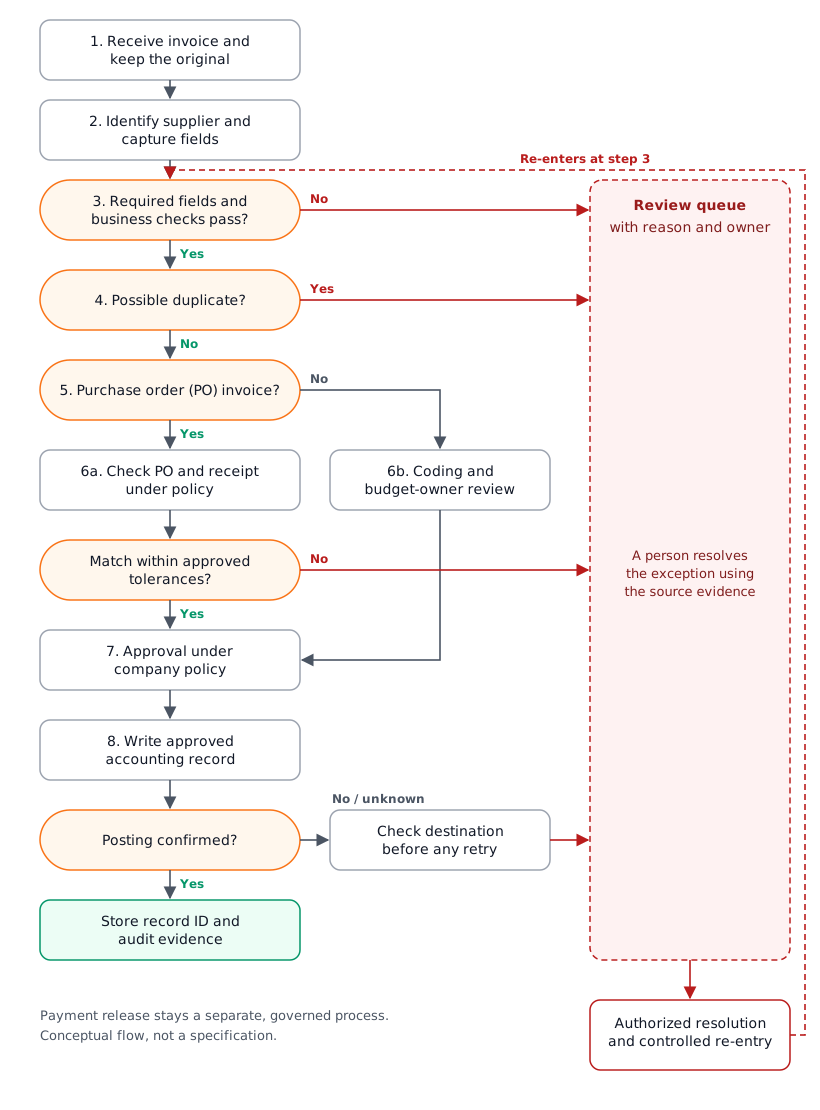
Your systems may use different states, and payment release stays a separate, governed process.
Who owns each exception
| Condition | What the reviewer should see | Suggested owner | Released when |
|---|---|---|---|
| Missing or uncertain required field | Source document with the extracted value highlighted | AP reviewer | Value corrected or confirmed, with a record of who did it |
| Totals don't reconcile | Line items, totals and the failed rule | AP reviewer | Discrepancy explained or corrected |
| Possible duplicate | The candidate records and the fields that matched | AP reviewer | Duplicate decision recorded explicitly |
| Received quantity differs from invoice | Invoice, PO and received quantity | Receiving or purchasing owner | Resolution documented under finance policy |
| Non-PO invoice | Coding, purpose and approver | Budget owner and AP | Required review and approval complete |
| Supplier bank details changed | The change request and the current trusted supplier record | Authorized supplier-record owner | Change verified through your approved independent process |
| Accounting write result unknown | Request reference, time and destination lookup result | Integration support owner | Destination checked before any retry |
When the accounting write times out
Imagine the accounting system's API times out right after the workflow submits an approved invoice. This is a hypothetical case. A timeout doesn't prove the write failed. A blind retry can create the very duplicate the earlier checks were built to stop. A safer sequence:
- Record the request reference and the time, and mark the invoice "write result unknown".
- Look the invoice up in the destination by your stored reference, or by supplier and invoice number.
- If the record exists, store its ID and mark the invoice posted. If it doesn't, retry using the API's duplicate protection, if it offers one.
- If the result is still unclear, send it to the integration owner's queue. Don't keep retrying.
Some accounting APIs offer duplicate protection for retries. Xero's idempotent requests guide, for example, describes an Idempotency-Key header for POST, PUT and PATCH requests. A repeated request with the same key returns the cached response instead of being processed again. Keys are stored for 6 minutes, so they cover quick retries, not a check the next morning. After repeated errors, the guide says to make a GET request to check whether the resource was already created.
These are design recommendations. They don't by themselves guarantee fraud prevention, compliance or correct accounting.
Use what you have, integrate, or build custom?
Start with what you already pay for. Many accounting and AP tools include capture, approval routing or matching features. Check those first.
| Option | Fits when | Watch out for |
|---|---|---|
| Existing features | Your tools cover your intake channels, approval rules and exceptions with acceptable manual effort | Workarounds that live in someone's inbox |
| Integration | The gap is a handoff between systems that both support it, such as approved invoices moving from an AP tool into your ERP | Who monitors the connection, and what happens on an unknown write |
| Custom software | Your rules are complex, a key system has no suitable connector, or reviewers need a screen built around the evidence in the exception table | Ownership, maintenance and support after launch |
Compare the total operating burden, not just the build cost. That means access and permissions, maintenance when a supplier changes format or a system updates its API, monitoring, and who supports it when something breaks.
Pilot with real invoices before you go live
A pilot should prove the workflow handles your messy cases, not just clean ones. Include:
- several suppliers with different invoice layouts;
- poor-quality scans and phone photos, if you receive them;
- non-PO invoices, credit notes and partial deliveries;
- a deliberate duplicate.
| Group | Count | What it tests |
|---|---|---|
| PO invoices that should pass | 40 | Straight-through path and posting |
| PO invoices with known mismatches | 20 | Price and quantity tolerances, receiving owner queue |
| Non-PO invoices | 15 | Coding and approval routing |
| Poor scans and phone photos | 10 | Required-field stops and the review screen |
| Credit notes | 5 | Sign handling and matching to the original invoice |
| Deliberate duplicates | 5 | Duplicate rule and false-alarm rate |
| New supplier formats | 5 | Supplier identification and field mapping |
Agree acceptance criteria with finance before you start. Run early postings in a test environment or as drafts that need confirmation, and verify what each connected system actually supports.
Extraction tools often attach a confidence score to each field, and teams use these to decide what goes to a person. Microsoft's transparency note for Document Intelligence describes customers calibrating their own thresholds to route content either to straight-through processing or to human review. Thresholds depend on your documents and your tolerance for errors, so set them from your pilot data rather than a generic number. A high confidence score means the text was probably read correctly. It doesn't mean the invoice is legitimate or should be paid.
Pilot exit questions
- Can reviewers find the source evidence for every flagged invoice?
- Does an unexpected or failed write stop safely, without a blind retry?
- Can support check and resolve an accounting timeout?
- Are permissions limited to each person's assigned tasks?
- Can the team export the audit trail?
- Is there a named owner and a written recovery procedure?
What to measure, and who owns it
Define each measure before you collect data, and record a baseline from your current process so comparisons are fair.
| Measure | How to define it | Watch out for |
|---|---|---|
| Human touch time | Staff minutes spent per invoice, including exceptions | It's not the same as waiting time |
| Elapsed time | From receipt to confirmed accounting record | State whether weekends and approval waits count |
| Field accuracy | Correct required fields ÷ required fields reviewed | Accurate fields don't mean a correct invoice |
| Straight-through rate | Eligible invoices that reach the agreed endpoint with no human touch ÷ eligible invoices | Define "eligible" and the endpoint; it isn't the same as auto-paid |
| Exception rate and age | Flagged invoices ÷ total, and time unresolved, by reason | A low rate alone doesn't prove quality |
| Posting integrity | Accounting records reconciled to authorized source invoices | Check for duplicates, missing records and unknown writes |
| Operating cost | Software, review time, support and maintenance for the period | Saved minutes don't automatically become cash savings |
Give the workflow a named owner after launch. Supplier formats change, approval rules change and APIs change. Someone has to watch the exception queue and decide when a rule needs updating.
Sources
Official documentation and guidance, checked 5 November 2026. Product documentation shows that product's documented behavior, not every system's.
- Amazon Textract: Analyzing invoices and receipts
- Microsoft Learn: Three-way matching policies (Dynamics 365 Finance)
- SAP Developers: Invoice processing and approval using SAP Build Process Automation
- Microsoft Learn: Transparency note for Document Intelligence
- Microsoft Learn: Document Intelligence invoice model
- European Commission: Registry of supporting artefacts to implement EN 16931
- OpenPeppol: Peppol BIS Billing 3.0
- Microsoft Learn: Manage sequential approvals with Power Automate
- Microsoft Learn: Create parallel approval workflows (Power Automate)
- Microsoft Learn: Configure approval steps in a workflow (Dynamics 365)
- FBI Internet Crime Complaint Center: Business email compromise PSA (2020)
- Xero Developer: Idempotent requests